Here’s how to optimise your website for AI search tools
Here’s what you can do to optimise your website for AI search tools like ChatGPT.


Searching for information online has changed. AI tools like ChatGPT or Gemini are increasingly being used to find information instead of search engines like Google or Bing. If you’re still sceptical, consider that ChatGPT alone processes over 2.5 billion prompts a day.
If you have a website, this is a big deal. Your customers are searching for information using generative tools. You want to be appearing in their generated results.
It’s early days still, but data suggests that traffic from LLMs (large language models, like ChatGPT) converts at a very high rate. Whether that’s because LLM users treat generated answers like personal recommendations, or because LLMs present the user with just a few curated links (rather than barraging them with 10+ blue links), is still to be determined.
Introducing a new acronym: GEO
Everyone’s heard about SEO. Website owners and developers already put lots of effort into optimising their websites for search engine rankings. Generative AI introduces not only a new bunch of content considerations and technical tweaks, but also a new acronym to remember: GEO (generative engine optimisation).
The most important difference between SEO and GEO is their delivery methods. SEO provides a user with website links. GEO delivers answers.
The goal is different too. With GEO you’re trying to encourage AI to mention you in its responses, rather than focus on gaining website traffic like SEO. As a result, GEO "success" isn’t always as visible as regular web traffic.
GEO, much like SEO, will never be something you can consider complete.
For example: when a user asks ChatGPT “Which local web host has the best service?”, an AI model will generate a response that evaluates publicly available information about local web hosting providers and their customer service. It weighs up reviews, forums, and online content, before ultimately giving the user recommendations based on recent trustworthy sources.
LLMs generate answers based on all the content they can parse through. You can’t control everything though, meaning other information about you on the internet will contribute to its answers, regardless of your GEO efforts.
Don't forget what you already know
The good news is that any SEO knowledge you’ve already picked up is useful. Good GEO builds on top of strong SEO fundamentals rather than replacing it or making you create things differently.
This may sound familiar to you already, but the three biggest things you can do to make your website’s content GEO-friendly are:
- Creating high-quality authoritative content that users want to read.
- Making pages which are technically accessible for both your users and LLM bots.
- Earning authority through external verification (SEO does this through inbound links to your pages, GEO does this through reviews, awards, and content and posts about you).
It’s not SEO vs GEO. But remember: your end goal with GEO is different from SEO. Instead of aiming to build web traffic you’re aiming to be the source of information for AI engines.
Actions you can take right now
There are some steps you can take straight away to optimise your pages for AI tools.
Add an llms.txt file
An llms.txt file is a document you can upload to your website’s root directory (the folder that contains all your other folders) to help AI tools understand your website’s most important content. The file makes it easier for the AI models to navigate your content, telling it which parts of your site to ingest and a brief description of what they contain.
The easiest way to create an llms.txt file is to use a free online generator like WordLift or SiteSpeak to generate the file. You will then probably want to add details and modify this generated file, like in the example here.
You could also create your own file manually, but that’s a more technically-savvy approach and can be quite time consuming (especially if your website has lots of pages).
Once the file is created, you’ll need to access your website’s root directory using your web host’s file manager, and upload the llms.txt file.
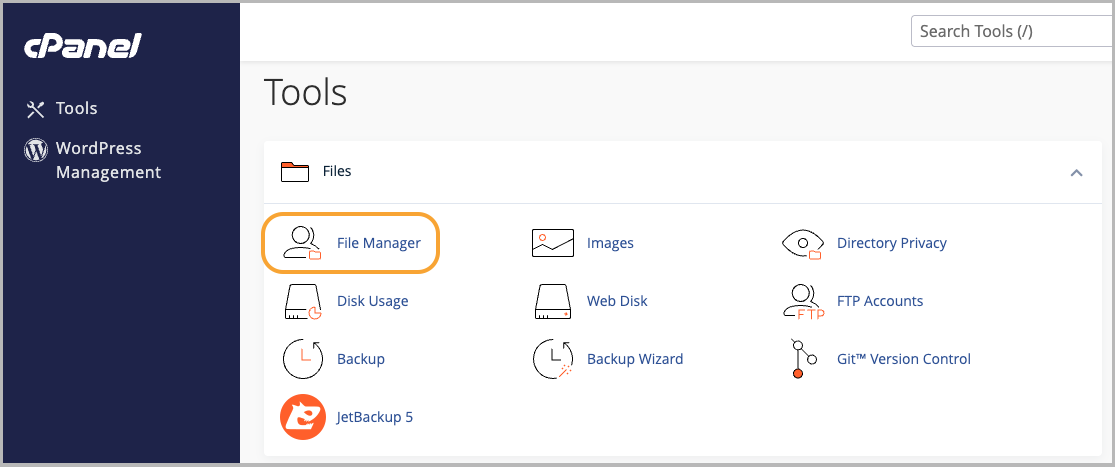
If you’re using MyHost to host your website, you can upload an llms.txt file by accessing cPanel, opening File Manager from the dashboard, and uploading the file to the root directory.
Low latency
If your website runs slowly because you’ve got too many big files slowing your load times, or your hosting provider is holding you back, then AI is not going to want to get information from your website. You need fast response times to make sure LLMs don't timeout. The same principle applies for SEO, where search engines prioritise pages that load quickly.
If you’re using WordPress, you can use PHP Vitals to see how your web host’s servers affect your website’s performance.
Avoid information discrepancies
LLMs will trip over and skip you as a source if there’s conflicting information about your brand across the internet. Make sure public facing pages outside of your website, like your company’s LinkedIn, match the information displayed on your website.
Structure it so AI can read it
Like humans, AI finds it much easier to read clearly structured content. Nothing revolutionary here, but it will pay off to give extra attention to making sure your content uses:
- Correct H2 and H3 headings.
- Bulleted lists and tables that are simple and easy to read.
- Citations and links to other authoritative sources.
- Mostly short paragraphs (2-3 sentences). Long sections of text are harder for AI to parse.
Anchor answers
AI engines like direct and concise answers. Placing 40-80 word answers to a query at the top of a page makes it as clear as possible for the AI to understand your article.
Related articles:
- Technical SEO tips: Help your business website talk to the bots
- Using WordPress? Here's the SEO basics for any WordPress site
- Improve your webpage load time to increase your SEO
Things to keep working on
Some GEO improvements require more ongoing and strategic effort, rather than immediate fixes.
Frequently update content
AI engines have a bias for recently published information. Update blogs once their information goes out of date, revisit your most important content to keep it fresh, frequently update statistics, and keep publishing new content to make sure you stay relevant to the LLM.
Be an authoritative source of information
Your content needs to act as an authoritative resource that AI engines trust. Cite statistics with sources, share real case studies and project examples, and make it clear who wrote the article.
Get others to mention you
AI engines value websites that are referenced by plenty of external sources. LLMs will trust you and be more likely to use you in its answers if there are lots of Reddit threads, YouTube videos, Wikipedia articles, or industry award pages talking about your product.
It’s helpful to know this, but the downside is that getting talked about in these places is outside of your direct control.
SEO provides a user with website links. GEO delivers answers.
Don’t get dispirited if you’re seeing larger competitors appear more in AI prompts. Established brands usually have extensive digital footprints. They’ll be more likely to have external validation, such as Wikipedia pages, covering them which a small company would never match. This leaves LLMs with the impression that bigger companies are authoritative sources.
This doesn’t mean you should start making Wikipedia pages about your brand (that kind of self-promotion will likely only result in getting blacklisted by Wikipedia). Instead, smaller businesses have the advantage of being able to move faster. You can tailor your website’s content to be laser-focused on your local market, and written in a genuinely authentic way that connects with your exact audience—something a large company serving millions of people won’t be able to match.
Track your progress
It’s hard to know if your GEO improvements are successful if you don’t track any statistics. You want to do what you can to monitor for brand mentions and page citations on ChatGPT and Google AI overview.
The best way to do this is using Google Analytics or a similar tool to track these metrics and see how they change over time. You can use Google Analytics to see how many users visited your website based on ChatGPT citations.
Google’s AI Overview citations are unfortunately lumped in with other organic search traffic on Google Analytics. There are third party SEO tools out there that conduct and monitor competitor comparisons for Google Overview searches, although these will not normally be free services.
Just the beginning
GEO, much like SEO, will never be something you can consider “complete”. The more work and consideration put into it, the better your chances are of being cited ChatGPT or Gemini. Results won’t show overnight, so give your changes time to take effect before giving up.
Don’t worry if you’re just wrapping your head around GEO for the first time. The topic goes much deeper than one article can cover, and it's still an emerging field. AI algorithms will continue evolving, so GEO methods will change and adapt to follow as we better understand how these engines work.
The most important thing is to get started on your GEO journey now.
Photo by Matheus Bertelli from Pexels
Hosting and domains
What can we help you with?
Web Hosting
From $8.95/mo
Domains
From $13.50/yr
Virtual Servers (VPS)
From $19.95/mo
Reseller Hosting
From $29.95/mo
Any questions?
If there's anything you want to know about web hosting, domains or servers, our experts are here to help.
Contact usPeople Sharing The Love
Fastest hosting I've had so far, as well as having great support to help me with my website! Thanks guys!

I've tried a bunch of others and I recommend MyHost without hesitation - MyHost offers exceptional value, great features (usually found on over-priced services) and second-to-none help. Do you guys ever sleep?

"Amazing service, I've hosted with many company but the support within this company is a lot better than any other I've been with. Keep it up team!"
