WordPress 7.1: Following up on the big one with some cool new blocks
WordPress 7.1 builds on much of what 7.0 started. Some noteworthy new blocks like Tabs and Playlists have also been added.


The long awaited WordPress 7.0 dropped earlier this year.
That milestone update was all about adding “AI-friendly” features, and overhauling the user navigation overlay.
Since then, WordPress has kept rolling out minor releases and more recently dropped its minor milestone 7.1.
Where 7.0 left us
Many of WordPress 7.1’s improvements are building from where 7.0 left off.
In case you missed it, some of the most noteworthy features rolled out in 7.0 were:
- AI Connectors: Connect your preferred AI provider to your WordPress site and use it to help create tiles, generate images or alt text.
- Visual revisions: Scroll through a timeline to visually demonstrate how a page changed over time. On the same timeline, you can find and restore old page versions in one click.
- Customisable Navigation Overlays: You’ve now got full creative control over hamburger/navigation menus. Previously the design, layout and content were all locked. Now you can build it from scratch with blocks and Patterns in the Site Editor.
For a comprehensive list of features and changes included in 7.0, check out the WordPress 7.0 release notes.
7.1: New blocks to try out
WordPress has been all-in on blocks since 5.0. Blocks are the rectangular pieces you put together to build a site; stuff like “Heading”, “Paragraph”, “Gallery”. Each new release usually brings some interesting new blocks to play around with, or an overhaul of existing ones.
In 7.1, one such new block is the Tabs block. It lets you organise content into clickable panels. You can organise it based on things like product specification, FAQ sections, pricing comparisons. It’s meant for any scenario where you’ve categorised content and needs a compact, tabbed layout. For anyone with a WooCommerce store, this Tabs block could be a natural fit.

The other big new block is the Playlist block. It lets you display audio tracks with metafile data (artist, album art, etc.), and customisable waveform visualisations. It's useful for podcasts, music, or any other audio that you upload and host on your site. Embedding multiple audio tracks together previously required a third-party plugin, now you can just use the Playlist block and display a set of audio clips together.
More responsive, easier editing
Outside of blocks, the site editor now has more responsive controls, letting you style how blocks look at different screen sizes, without custom CSS. It also means you can preview changes at different viewport sizes while you’re working.
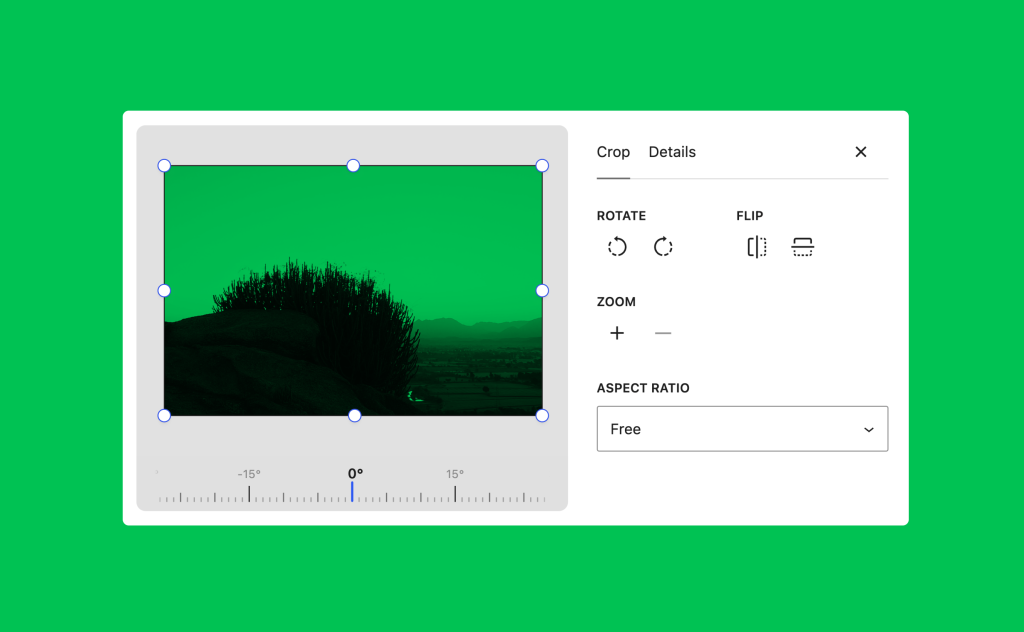
Image cropping also got overhauled and the inline cropping tool has been replaced. Now you’ve got a more conventional set of cropping tools, including freefrom and aspect-ratio cropping, horizontal and vertical flipping, as well as precise rotations.
All things considered, WordPress 7.1 was more than just a stability and security update for 7.0 (although it did that too).
More ways to collaborate, but still not the big one
Live multi-author editing—the promised feature that delayed 7.0’s release in the first place—is still yet to be rolled out.
On the collaboration front, 7.1 did roll out more support for inline notes. When you’re leaving a note on an in-progress post or page, you can now tag collaborators with “@” to notify them. You can also bold and italicise text freely now that rich text is supported in these notes. It’s not exactly the same as two people editing the same page at the same time, but every improvement helps.
The new revision tool in 7.0 was also a handy addition to the collaboration tool suite, and 7.1 added ways to share links to older versions of a post. The recipient of the link will see colour-coded changes of what changed, much like you’d see in Google Docs.
Unsure if you should upgrade?
As always with these big updates, the new release introduced some new hiccups.
Notably, the WP Rocket plugin and WordPress 7.1 were completely incompatible at launch. Anyone with the plugin who had upgraded to 7.1 encountered fatal errors. Thankfully, updating your WP Rocket to the newest release fixes that issue.
The fix came in quickly, which is good, but not as good as avoiding issues and errors altogether. WordPress users were quick to report issues, as they usually are. By keeping an eye on WordPress communities online you can stay better informed when deciding to upgrade now or later down the line.
To see every change and improvement packed into 7.1, check out the official WordPress 7.1 release notes.
Get WordPressing
We generally recommend keeping your WordPress site up-to-date as much as possible. Even when the new features don’t seem that exciting, it’s usually worth st 7.aying-up-to-date to patch out bugs and vulnerabilities.
Or maybe you're looking to launch a new WordPress site? Whatever kind of site you're looking to build, MyHost has fast, reliable and easy WordPress Hosting plans to suit your needs.
Images sourced from WordPress 7.1 release notes.
More from MyHost
Hosting & More
Web Hosting
From $8.95/mo
Domains
From $13.50/yr
WordPress Hosting
From $8.95/mo
Virtual Servers (VPS)
From $19.95/mo
Any questions?
Any questions about WordPress hosting? Get in touch with our friendly team.
Contact usPeople Sharing The Love
Fast response time. A very pleasant experience with my first time delving into WordPress. Response time to questions to MyHost support was very fast and helpful. Installation was straightforward as it should be. Great job MyHost. Thank you very much. ★★★★★

Very happy customer. I wish I looked into changing to these guys years ago! Very pleased with their pricing, helpfulness and timely responses to all my questions. Plus I so much prefer the simplicity of their email UI compared to what I was on previously. Would definitely recommend MyHost to anyone! ★★★★★

Fantastic support with hosting, and just a fantastic knowledge base overall. I was let down by Crazy Domains, nothing worked. MyHost transferred the domain and everything worked as expected instantly. I made a mistake and the site went down, but within 30 minutes MyHost reverted my changes and saved the day. ★★★★★
