New update to our WordPress plugin does more than show how fast MyHost is
PHP Vitals shows just how fast MyHost’s web servers really are. Now we’re giving you ways to speed up your website yourself.


Last year we rolled out our first WordPress plugin: PHP Vitals. It’s a free, easy, and objective way for anyone with a WordPress website to compare their web host’s servers against other web hosts. As it currently stands, MyHost sits right near the top of that leaderboard.
The plugin runs tests directly on your server, measuring how quickly your host’s servers can handle PHP code (PHP being the programming language that powers WordPress). Your website and CMS files are ignored; the plugin literally just tests the hardware’s ability to run PHP.
Before PHP Vitals, there wasn’t really an objective way to measure your provider’s speed. That’s something we’re trying to change.
Now, a bit over a year after the launch of the plugin, we’ve released a new major PHP Vitals update: v1.6.
What’s slowing you down?
There are so many different potential culprits that can create latency for your visitors. One bottleneck you’ll never be able to improve without switching web hosts is slow server speeds. Pages can only be displayed as fast as the server hosting your website can render it.
That’s why we’ve engineered PHP Vitals to give users the choice to share their benchmarks publicly, including what web hosting provider they use. All that data is made publicly available on the PHP Vitals website, putting objective information out there for anyone to read.
Submitted test results are collated in a public leaderboard, displaying aggregate rankings of hosting providers. And guess what: the current standings have MyHost sitting second on the leaderboard.
These data comparisons used to be the end of the picture. Now with v1.6, the plugin also shines a light on ways you can improve PHP performance, on your own end.
How to install PHP Vitals?
Keen to give PHP Vitals a try?
Search for “PHP Vitals” within the WordPress dashboard and install it there, or download PHP Vitals directly from the WordPress plugin directory.
When you visit the WordPress plugin directory you’ll see that PHP Vitals is credited to our sister company Webslice. That’s us, the same team, operating under the name of our international brand.
Running benchmarks not only gives you a grade for your hosting, but also lets you see for yourself how your hosting compares to thousands of other testers.
If you’re friends with any WordPress developers hosting their sites with other web hosts, challenge them to a PHP Vitals race to see whose hosting stacks up higher. We’re quietly confident that your MyHost servers will come up tops (we’ve got the second highest score on the PHP Vitals leaderboard after all).
Once you’ve run benchmarks, if you’re still wanting to push performance further, you can now look at optimizing PHP settings yourself.
Related article: Web Hosting shopping guide
What a year of PHP benchmarking has taught us
The new update marks one year since we released PHP Vitals. In that time, thousands of curious web hosting customers from 42 countries across the world have run PHP Vitals benchmarks.
From those thousands of reviews, all data submitted to PHP Vitals is made publicly available on the PHP Vitals website. The data makes for some interesting insights.
Price points
You’d be forgiven for thinking higher pricing = faster hosting. Our benchmarking averages suggest it’s not quite that clear cut.
When it comes to shared hosting (the most popular way to run small WordPress sites), you generally get better PHP Vitals performance when you spend a little more. Interestingly, users paying more than $50/month USD for shared hosting get worse results on average than all other price categories. Ouch.
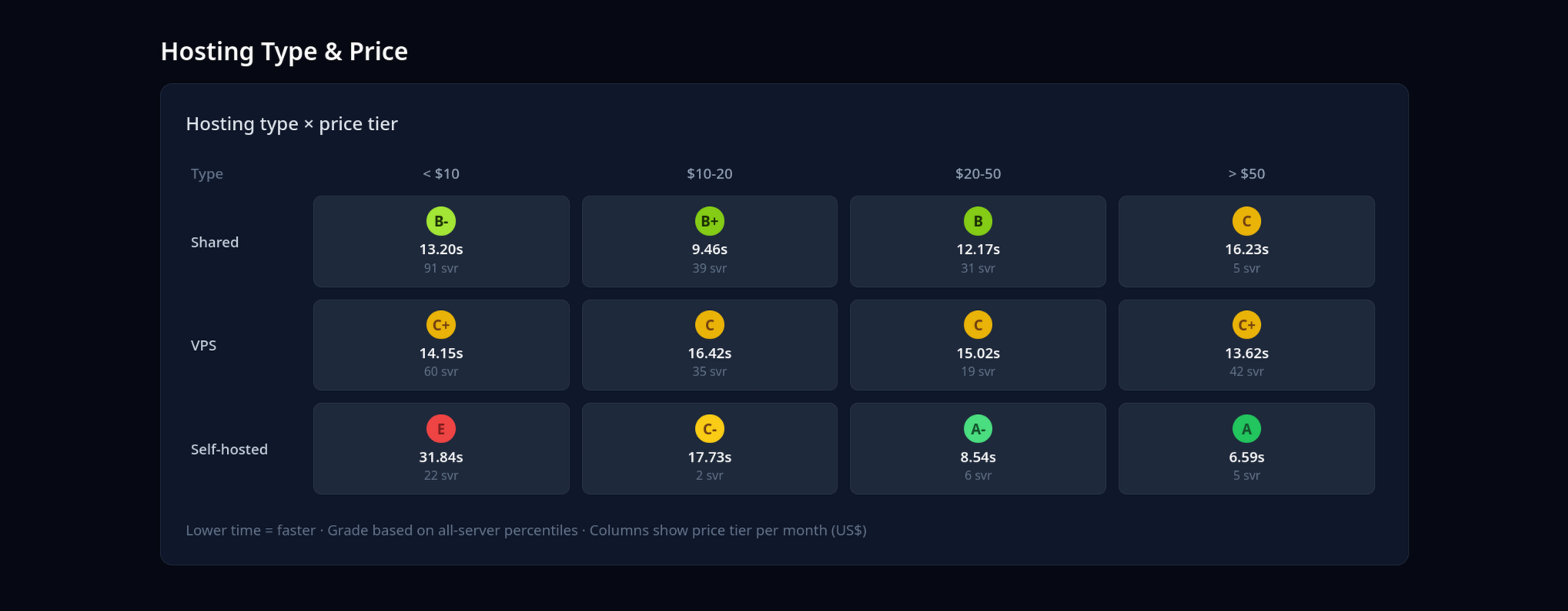 When you move up to VPS hosting, the PHP Vitals data doesn’t show any distinct correlation between price and performance. The $20-50 USD price tier seems to get worse results than the $10-20 USD and <$10 USD tier. Take from that what you will.
Newer PHP versions should help
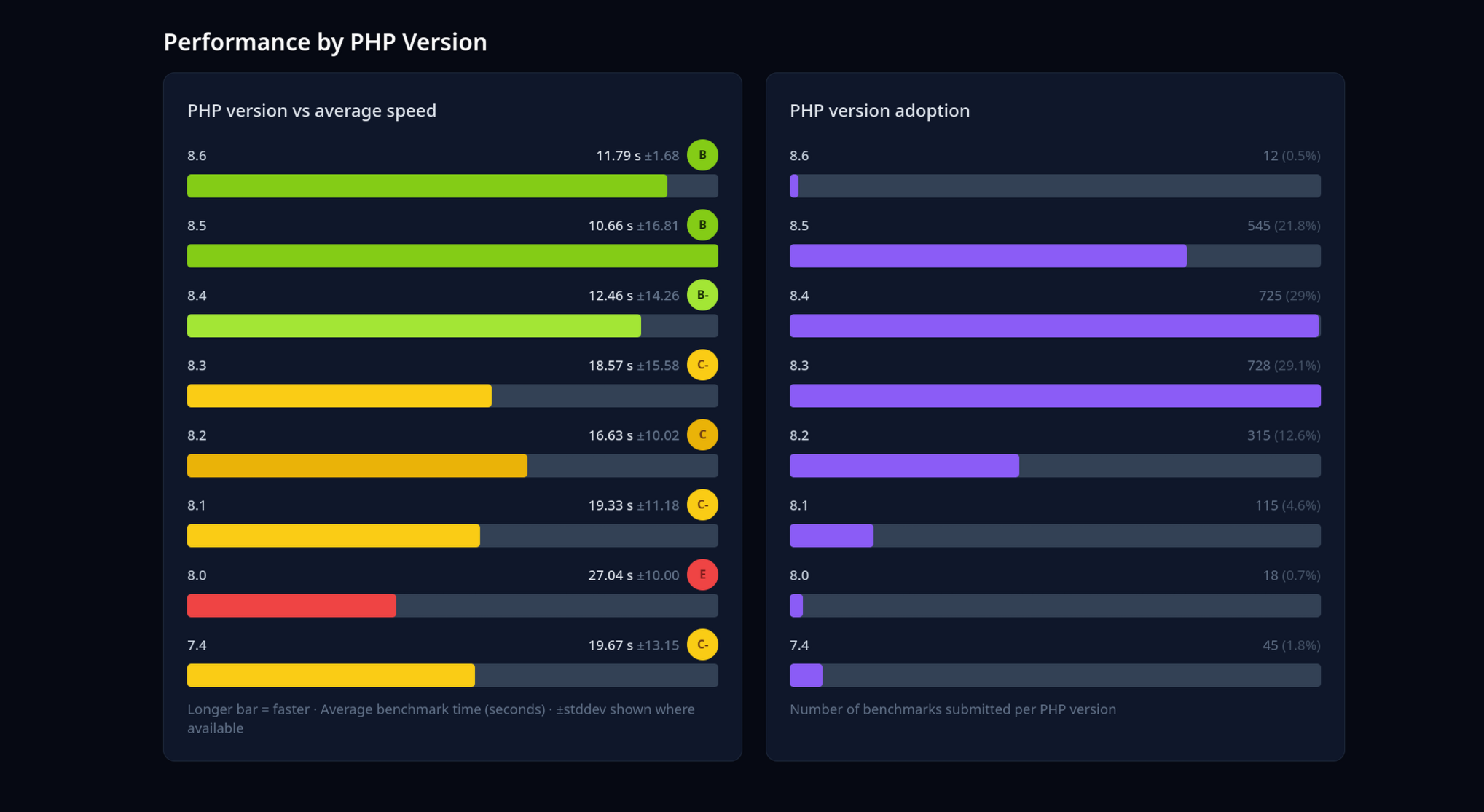
The data also highlights the comparative performance of different PHP versions. Overall, the trend shows keeping your PHP version updated (rather than years out-of-date) will improve your PHP performance.
In general, our recommendation is to keep your PHP version as up-to-date as possible. Running WordPress on older versions of PHP can cause incompatibility issues and crashes, and expose you to security vulnerabilities.
Some hosting providers let you choose PHP version, some restrict you to older versions that average worse than other new versions. Just something to consider. You want a web host that offers updated versions of PHP—if they don’t, that’s a red flag.
Optimise and tweak your PHP settings
Those of you who are particularly interested in getting the quickest load times possible may already know this, but there are actually some PHP settings you can change on your website’s backend to help optimise your WordPress performance.
If you’re on one of our Web Hosting or WordPress hosting plans, you’ll already be managing your site through cPanel.
It turns out cPanel lets you tweak PHP settings, and doing that can help optimise how your WordPress site runs (and how your server runs PHP code).
That’s where v1.6 of PHP Vitals comes in. This update is designed to help you know exactly which settings to tweak to squeeze the most out of your web hosting.
Now when you run PHP Vitals benchmarks, on the right of your results you will see the option to “Get optimization ideas from an AI assistant”. All you have to do is click on the AI tool of your choice (like ChatGPT or Claude) and PHP Vitals will prepare a prompt that your tool can read and give you tailored suggestions and settings you can tweak. Paste it in the chatbot and you’re good to go.
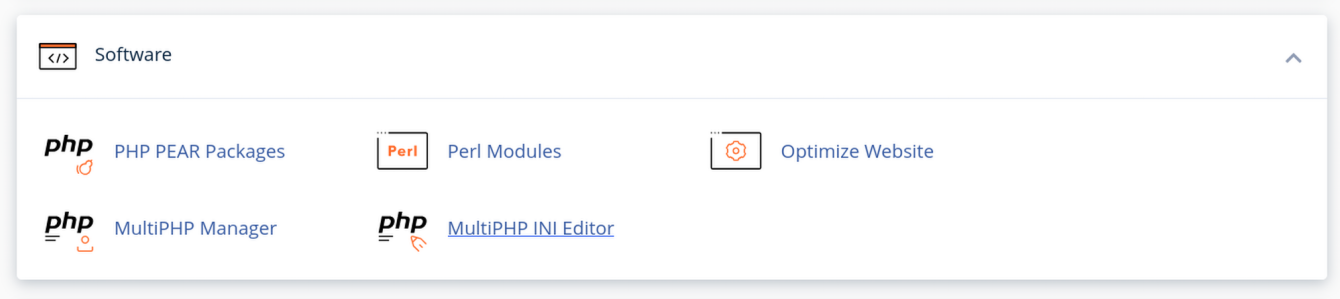
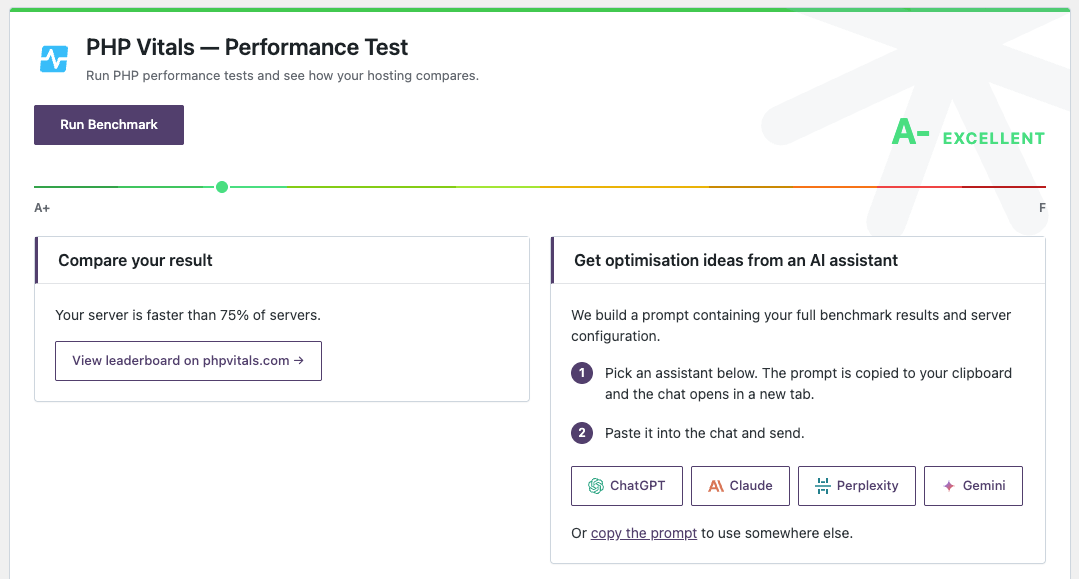 Your AI assistant will then give you some tips to tinker and adjust your site. You might then want to head over to cPanel and find the MultiPHP INI Editor. It’s the place in cPanel that lets you configure the PHP settings that your AI assistant recommends you make.
Know what you’re getting before you sign up
People should know what they’re getting before they sign up for web hosting.
An A-grade or higher from PHP Vitals tells you that your hardware is optimised for PHP, that it's genuinely modern (not using a 10-year-old CPU) and that you are free from other web hosting constraints. MyHost currently averages A+, so you can rest assured that with MyHost your servers won’t be slowing you down.
That’s why PHP Vitals exists, and why we keep updating it. It should be easy to tell if you’re getting good value from your Web Hosting.
More from MyHost
Hosting, Domains & More
Web Hosting
From $8.95/mo
Domains
From $13.50/yr
WordPress Hosting
From $8.95/mo
Virtual Servers (VPS)
From $19.95/mo
Any questions?
If you want to know anything about web hosting, domains, or building your own site, we're here to help.
Contact usPeople Sharing The Love
I've ran my own business for 8 years. Finally getting a website sorted. I'm a new user of the service and to date I've had great support and been able to talk one on one with someone who navigates me through set up. Better than a chat bot any day. ★★★★★

Great support when things go wrong. I patronised more than a dozen web hosts during my career, and I would say MyHost has one of the best support services that I have encountered. I've been with them for seven years, and I've been a very satisfied customer. Highly recommended! ★★★★★

I've tried a bunch of others and I recommend MyHost without hesitation - MyHost offers exceptional value, great features (usually found on over-priced services) and second-to-none help. Do you guys ever sleep?
